Varick Agents
Varick Agents implements AI inside Fortune 500 companies, designing and deploying AI agents that run real enterprise workflows.
- Role
- Founding Designer
- Timeline
- Spring 2026 – Present
Context
Varick needed a product we could use during client demos
It also had to be tailored to specific roles. An engagement manager, a forward deployed engineer and an engineer each needed to see the version of the product that made sense for them, and the client leads they presented to needed to see one product.
This is what we were demoing at the time: a finance case study built as a Claude artifact. It looked like a slideshow, and every block had its own typeface.
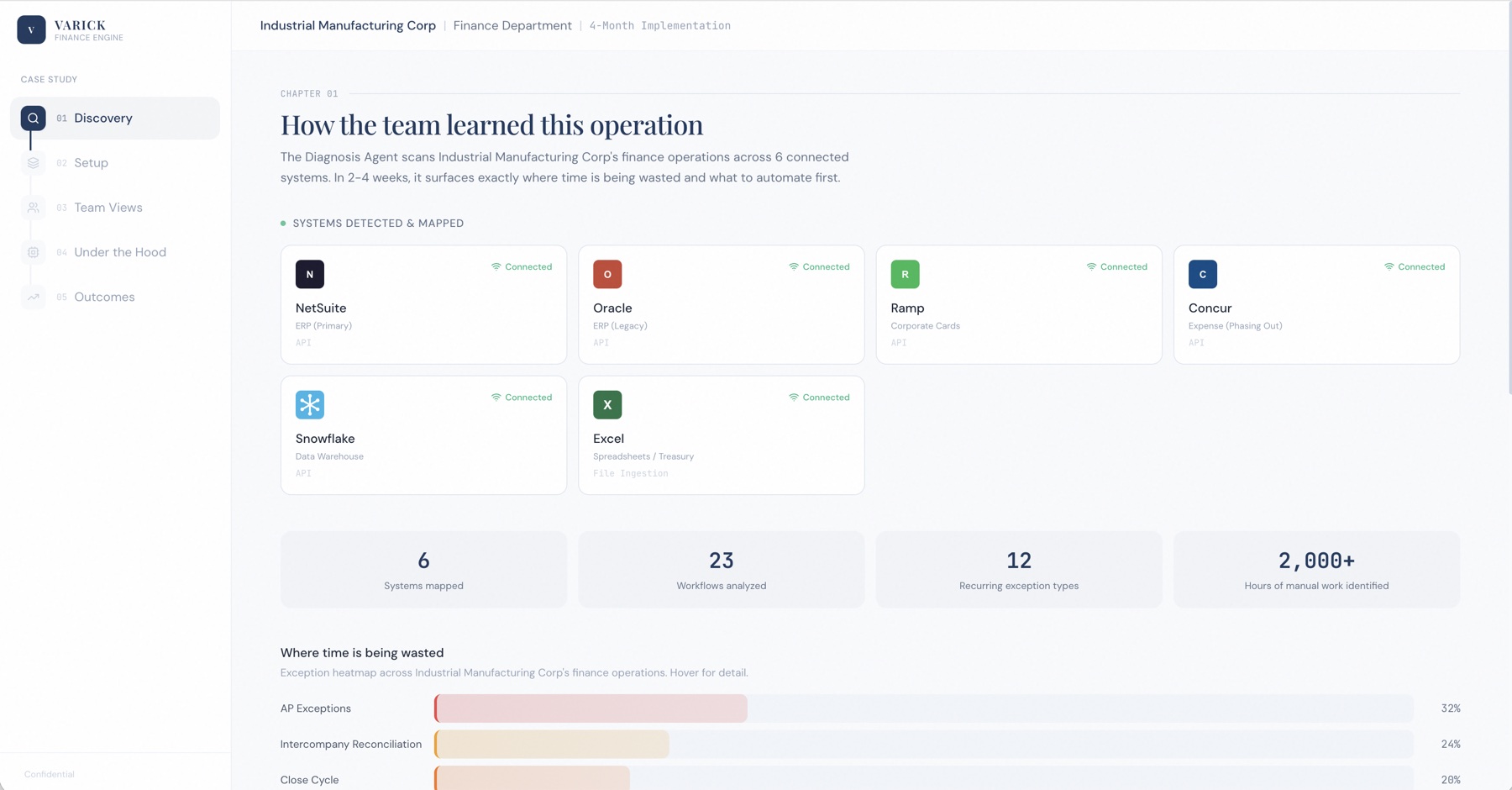
- A chapter list, not a product
- Vibe-coded: serif headline, sans body, mono labels
- Six logo colours, none of them ours
- Hard to read: tiny grey mono labels
- Numbers set in mono, no hierarchy
- Hard to read: pastel bars for the biggest number on the page
The problem
Varick did not have an operating system before I joined
The demos we presented to clients were interactive slideshows built as Claude artifacts. I also had no experience with Claude Code at that point, let alone merging pull requests. But I had to learn quickly so we could put something real in front of our enterprise client leads.
Insight 1
Engineers were using Claude to create an operating system
Every screen came out a little different, because each one was generated on its own. That kind of inconsistency screams cheap to an enterprise client.
Insight 2
No design system in place meant a bottleneck
With no shared tokens or components, every screen was a one-off. Engineers either waited on design or went ahead without it, and both cost us.
How might we
How might we build an operating system that reads as one product to enterprise clients, fits the role of whoever is using it, and lets engineers ship without waiting on design?
Solution
Varick OS
One product with one system underneath it. I started with the design system: the tokens, components and rules now live in code as the shared UI package, so engineers and the agents they build with draw from the same parts I design with. Varick OS is the surface on top: where the team builds agents, gets approvals, operates them for clients and demos all of it.
Different views
One OS, seen through each role's lens
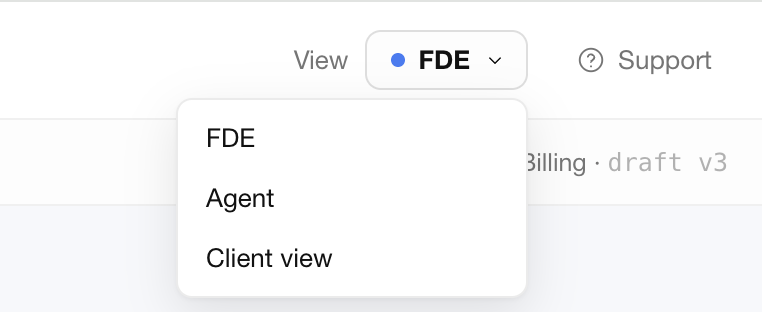
The same screens read differently depending on who is looking. A View switch in the header flips the workspace between the FDE view, the agent's own view and the client view, so a forward deployed engineer can rehearse exactly what the client will see without leaving the page. One codebase, one system, and no separate demo build to maintain.
Creating an agent
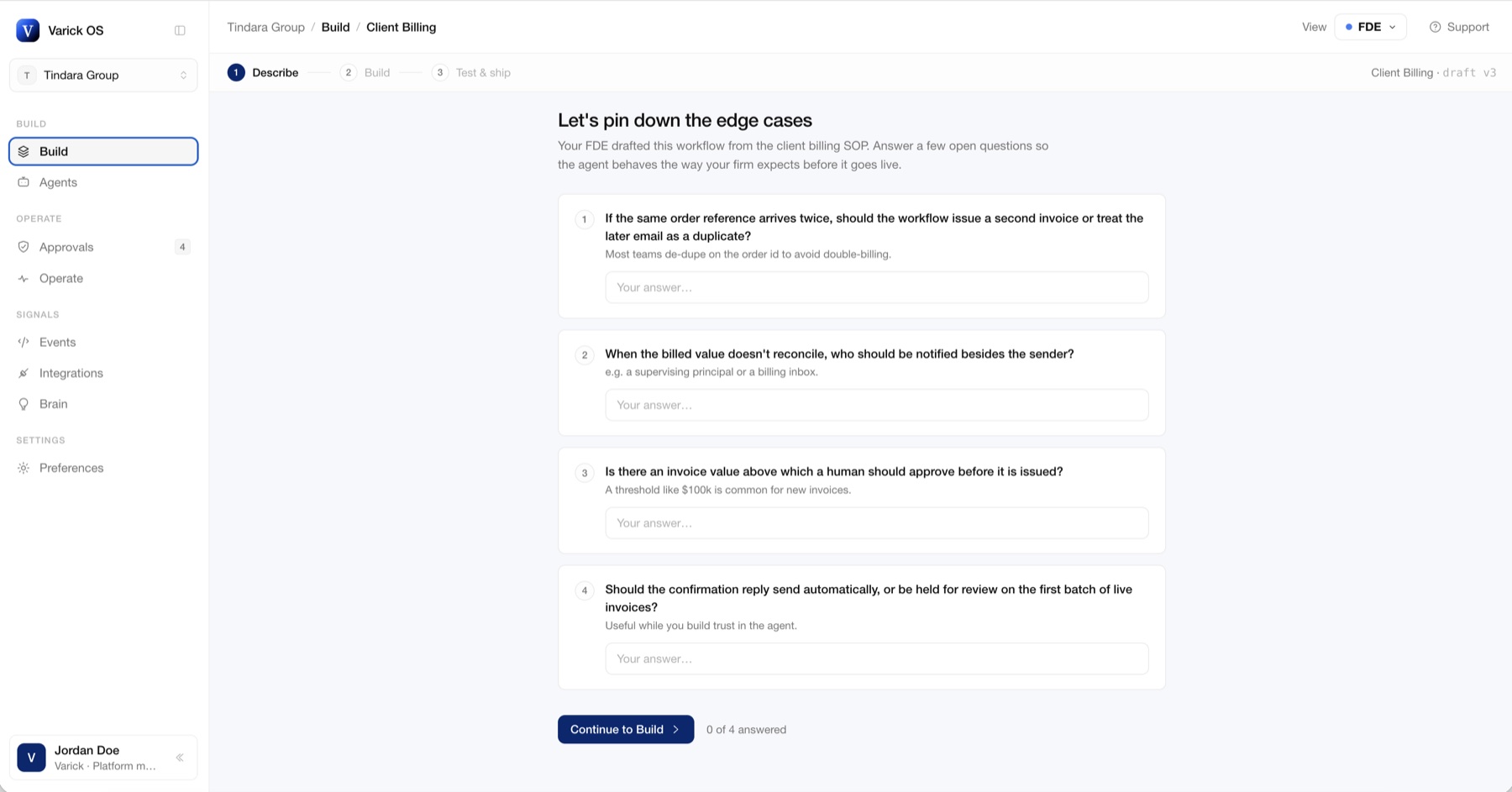
Describe, build, test and ship
Build is a three step flow. The forward deployed engineer drafts the workflow from the client's own procedure, then the Describe step asks the client a handful of plain questions about the edge cases: what to do with a duplicate order, who to notify when a value does not reconcile, when a person should approve. The agent behaves the way the firm expects before it ever goes live, and the client has been part of writing it.
Agent overview
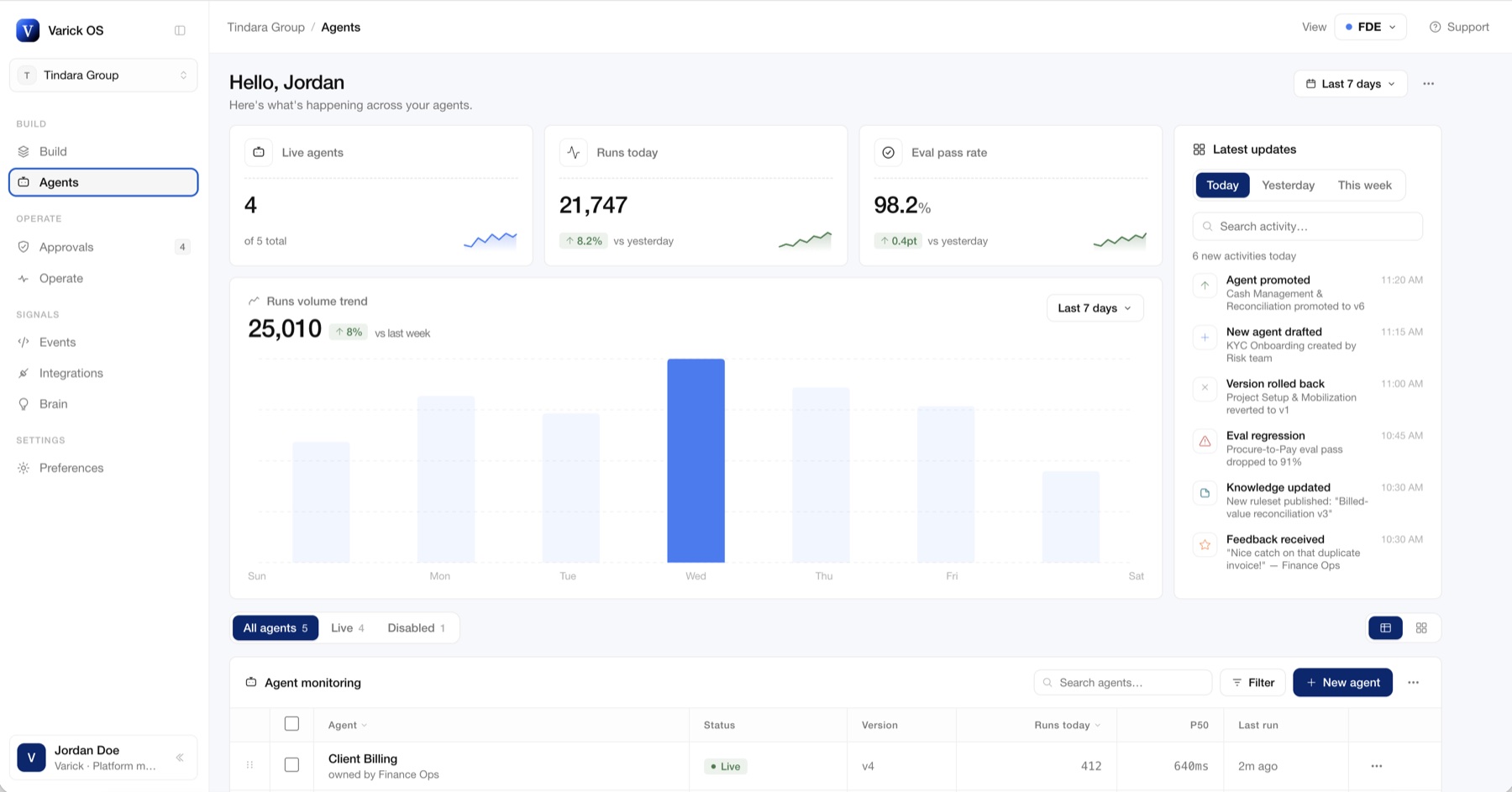
One page for everything happening across your agents
The Agents page opens with the three numbers that matter, live agents, runs today and eval pass rate, then the run volume trend and a feed of the latest updates: promotions, rollbacks, eval regressions, feedback from the client. Below it, every agent is monitored in one table with its status, version, runs and latency. It is the first screen in a demo and the screen an engineer keeps open all day.
Operate view
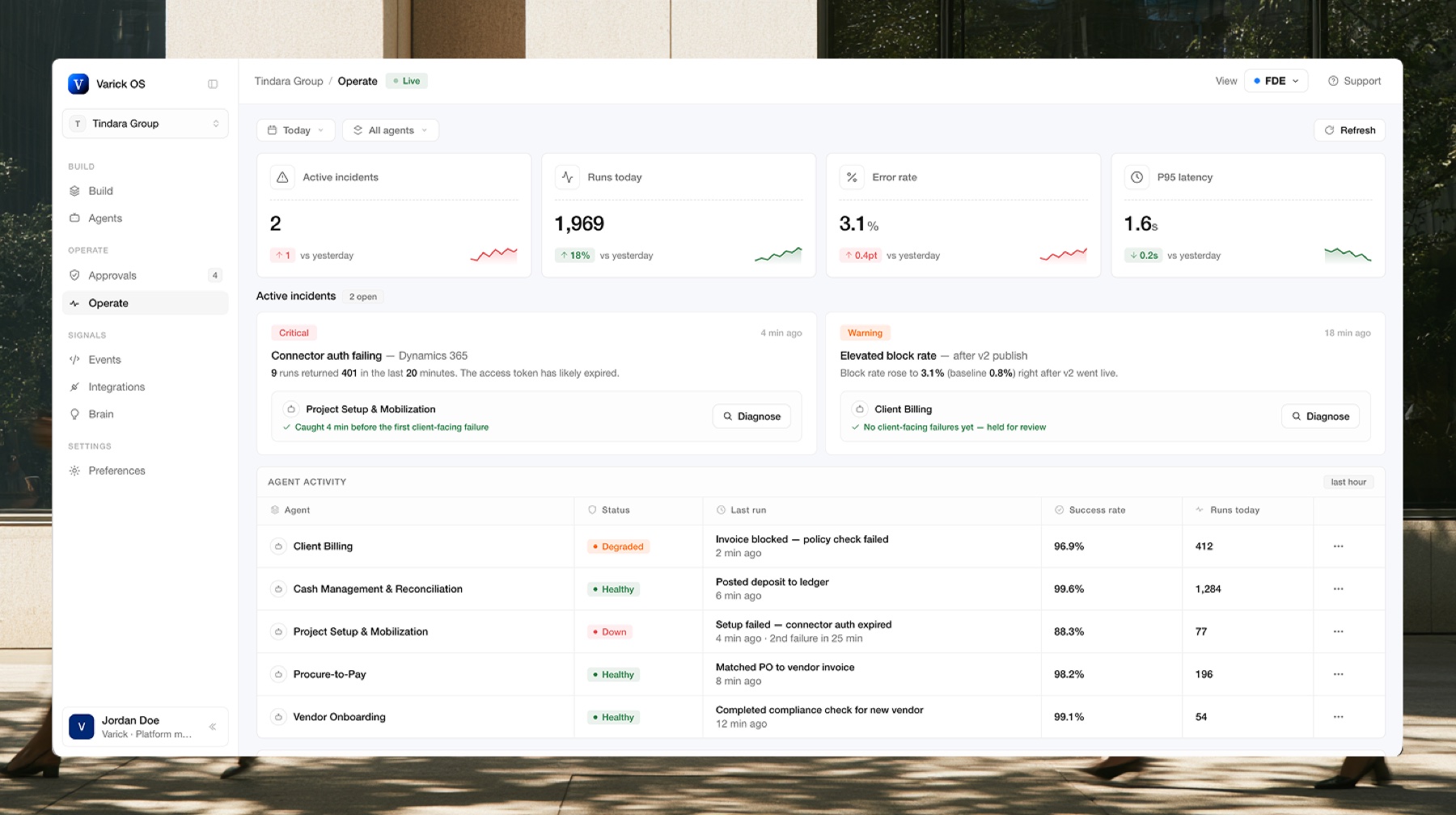
The Operate view, before and after
Operate is where the engineering team diagnoses a failed run from its trace and gets alerted before the client notices. The first version put the information on screen; the redesign made it legible at a glance: incidents ranked by severity, the run feed and agent health in one frame, and metrics that read as a system rather than a list.
This is just a snippet of my work on the Varick OS. Happy to share more through a call.
Redesign the Operate view so the team can diagnose a failed run at a glance.
Where it started
There was no research to inherit, so I started with the people who would use it every day
The engineers were the primary users. Before designing anything I sat in on how they built and demoed agents, and asked what they were tired of explaining to clients.
Research
Competitive analysis
Since the main users of the operating system would be our engineers, they suggested researching OpenAI, Vercel, Maestro and Cognition for agent-platform design insights. I read each one for how it shows an agent's state, how it handles the build flow, and how much it lets the data carry the screen.
| Platform | Product | What stood out | What I took from it |
|---|---|---|---|
| OpenAI | Agents SDK and AgentKit | A trace for every run, evals with graders, one registry for connectors | Traces and evals live next to the agent, not in another tool |
| Vercel | AI SDK and AI Gateway | One gateway for any model. Usage, cost and latency on every request | Metrics in one place, so they read as a system |
| Maestro | Agent command center | Runs a lot of agents at once, each in its own session, one screen to watch them all | The fleet view has to stay calm at 20 agents, not just 2 |
| Cognition | Devin | Sessions you can watch and jump into, playbooks for repeat tasks, one Devin managing other Devins | Show the work while it runs. Repeat tasks turn into templates |
Insights
Engineers wanted density and status, not decoration
The platforms they respected were calm and dense: tables over cards, status that reads at a glance, and a build flow that treats an agent as something you deploy rather than something you chat with. That became the brief for the design system as much as for the OS.
Reflection
My takeaways
Although it was a huge adjustment, I had to come out of my comfort zone to build a design workflow that is ten times faster with agents.
Always ask for feedback, no matter what.
Leverage AI to prototype. Sometimes Figma is the bottleneck, and building the prototype directly makes it easier to communicate with engineers and stakeholders.
Want to learn more?
For a more in-depth case study, please reach out to me at nlrdomin[at]uwaterloo[dot]ca
Next
Immigration and Refugee Board of Canada
An internal tool powering 90,000+ refugee cases/year